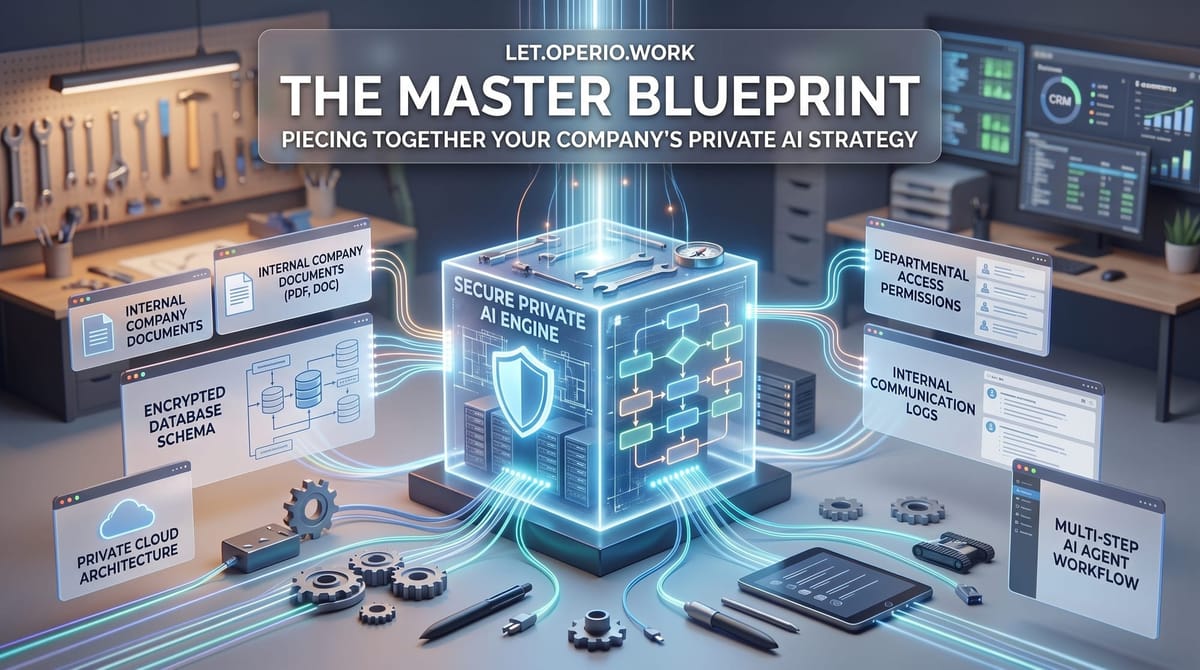
The Master Blueprint: Piecing Together Your Company's Private AI Strategy
The pieces of a private AI setup make sense one at a time. Here's how they fit into a single thing your company owns — and why that's worth more than the parts.

“So what does ‘our AI’ actually look like?”
You’ve probably worked through the pieces one at a time. An assistant that drafts your routine replies. A way for that assistant to look things up in your own files instead of guessing. A version that runs somewhere private, so your contracts and client records don’t sit on a shared public service. Maybe a few of these helpers, each handling a different chore.
Each piece makes sense on its own. What’s harder to picture is how they add up. Is this a drawer full of separate gadgets, or is it one thing? This is the last piece of the puzzle: how the parts fit into a single setup your company owns — a master blueprint — and why the whole is worth more than the pieces bought separately.
The plain answer
A private AI setup is really three parts working together. None of them is new if you’ve been following along; the useful idea is seeing them as one asset instead of three purchases.
One: the AI runs somewhere you control. Instead of sending your files off to a shared public service and hoping for the best, the software runs on machines that are yours, or rented just for you. Think of it as the difference between doing your books at a shared desk in a public library and doing them in your own back office with a lock on the door. Same work — very different exposure.
Two: it can read your own records before it answers. A general AI tool only knows what’s on the public internet. Give it a way to look things up in your own documents first — your past projects, your contracts, your policies — and it stops guessing and starts answering from your actual business. It’s the difference between a new hire who’s read your filing cabinet and a stranger on the phone who’s improvising.
Three: you have more than one helper, and they do multi-step jobs. A single chat window answers one question at a time. A small fleet of these helpers can each take on a different task — one drafts, one checks it against your pricing, one files the result — and each can carry out a job with several steps, not just a one-line reply. Less a single assistant, more a small back-office team.
Here’s the part worth slowing down for. Bought as three separate things, these are three subscriptions and three headaches. Assembled as one — private machines, holding your records, running a team of helpers that all draw on the same information — they become a single asset that belongs to you. The helpers get more useful as they see more of your work. The records stay in one controlled place. And because it’s yours, it doesn’t quietly change or disappear when someone else’s pricing does. That’s what “blueprint” means here: not a bigger pile of tools, but a plan for how the pieces connect into something you own.
A concrete example
Say you run a firm that answers a lot of proposals — bids, quotes, responses to a client’s list of requirements. Done properly, each one means digging through your past projects for the closest match, pulling the right numbers and terms, and writing it all up in your firm’s voice. It’s real work, and it leans on documents you’d never want on a public service.
Suppose a senior person spends most of a day on one of these — call it six hours of reading old files and writing. Fully loaded, if that person’s time runs about $50 an hour, one proposal costs you roughly $300 in staff time. Do a few a week and it’s a standing cost you barely notice because it’s spread across people’s calendars.
Now picture the three parts doing their jobs together. On your own machines — so the confidential files never leave — one helper finds the three most similar past projects and pulls the relevant terms. Another drafts the response in your firm’s usual style. A third checks the draft against your current pricing and flags anything that looks off. A few minutes later, your senior person has a full first draft to work from instead of a blank page.
They still have to review it — read it, catch anything wrong, make it theirs. Suppose that’s about 45 minutes, roughly $40 of their time. The running cost of that job on machines you already keep on is small — a few dollars of electricity and usage, call it $5.
So a $300 task becomes about a $45 one, and the expensive part — the senior judgment — is spent checking and finishing, not hunting through folders. Run that a few times a week and you’ve handed a capable person back a real block of their week for the work only they can do. Notice it took all three parts: private machines so the files stay put, access to your own records so the draft is grounded in real past work, and several helpers so the job got done in steps rather than one vague answer.
The honest caveats
This is the part the confident pitches skip, so let’s not.
A blueprint is a destination, not a first purchase. Standing all three parts up — your own machines, your records wired in, a set of helpers doing real jobs — is a project with real setup cost and ongoing upkeep. It is not a switch you flip on a Tuesday. Almost nobody should start here. Start with one annoying task and one tool, prove it saves real time, and let each win earn the next piece. The blueprint is where you might arrive after several honest experiments — not where you begin.
The review step never goes away. More helpers doing more steps does not mean nobody checks the work. AI tools still get things wrong, confidently — an invented figure, a term pulled from the wrong old contract. On anything a client sees or anything money rides on, a person signs off before it goes out. Count that review time as part of the cost, always. If you skip it, you didn’t save the time — you moved the cost to whenever the mistake surfaces.
Helpers that can touch your real files need limits. Once a fleet of assistants can read your records and act in several steps, you have to decide what each one is allowed to see and do — which folders, which actions, where a human has to approve before anything final happens. That’s not paperwork; it’s the difference between a useful back office and a costly mess. Building the blueprint means building those limits in from the start, not bolting them on after something goes wrong.
Owning it means maintaining it. Machines you control are machines you’re responsible for — updates, backups, someone who knows how it’s put together. That’s a fair trade for keeping your data private and the setup yours, but it’s a real, recurring line item. Price it honestly against what you’re saving before you commit, the same way you’d price any other piece of infrastructure your business depends on.
The takeaway
The master blueprint isn’t a product you buy. It’s what a handful of separate, proven wins can grow into: your own machines, holding your own records, running a small team of helpers that all draw on the same information — one asset your company owns, rather than three subscriptions you rent.
You don’t need the whole thing to start, and you shouldn’t try to build it all at once. But it helps to know where the road leads. So keep the picture in mind and keep the math honest: each piece has to save more staff time, in hours and dollars, than it costs to run and to check. Add the pieces one proven win at a time, wire them together only as each one earns its place, and one day you look up and realize the drawer of gadgets has quietly become something worth owning.