
When Your Tools Start Talking to Each Other: What That Actually Means for Your Week
Your software doesn't talk to your other software, so a person does it for them — carrying the same details from one screen to the next. That's starting to change. Here's what's real now, what's still a promise, and what it's worth in hours.
The part of the job that is just typing
A new client says yes. Good day.
Then the rest of the day happens. You type their name, address and phone number into your customer records. You type them again into the accounting system, because that’s where invoices come from. You make a folder on the shared drive, named the way you name folders. You put the kickoff in the calendar. You add three things to the task list. You write the welcome email. And somewhere in there you notice the email address has a typo in it — in one of those five places, and you’re not certain which one.
None of that was hard. None of it needed you, specifically. Every one of those systems already held most of that information, and not one of them would tell the others.
So a person carried it across. That person is the connection between your tools: the piece of software in the middle that nobody bought a licence for, and every business has.
That’s the part that’s starting to change, and it’s worth understanding without the sales pitch attached.
The plain answer
Business software was built as a set of islands. Each system has its own private way of being asked a question and its own private way of answering. Getting two of them to cooperate meant paying someone to build a one-off bridge between exactly those two — and that bridge quietly broke every time either side updated.
What’s changing is that software is agreeing on a common way to hand work to other software. Instead of a bridge per pair, there’s a shared way of saying here is what I can do, here is what I need, here is the result.
In practice that agreement is being worked out on four separate fronts, and they’re at very different stages:
- Reaching your tools and records. An assistant can ask your order system, your calendar or your customer list a question directly, instead of waiting for a person to look it up and paste the answer in. This one is real, settled enough to build on, and in daily use — including in our own systems.
- Handing a job to software someone else built. One company’s assistant passes a task to another’s, tracks it, and gets a result back — without either side exposing how it works inside. Written down, agreed, and working. Thin on the ground in the tools a small business actually buys.
- Acting on a website built for human eyes. Rather than an assistant squinting at your web page and guessing which button is which, the site offers it a proper set of actions. Genuinely promising. Being trialled in a couple of browsers, and it only works if your visitor is running an assistant in the first place.
- Paying for things. The newest of the four, and the least settled. More on that below.
One thing worth being clear about, because vendors blur it: none of these agreements decide what your software is allowed to do. They’re about the handover — the plumbing. The rules about what may be handed over, and what has to stop and wait for a human, are yours to set. The people who wrote the agreements say so themselves, plainly, in the documents.
What it’s worth: one task, end to end
Take the new-client setup from the top of this article.
Say you take on six new clients a month — an ordinary number for a small firm. Setting one up across your systems takes about 35 minutes when nothing goes wrong: the records, the folder, the accounting entry, the calendar, the tasks, the welcome email. That’s three and a half hours a month, or 42 hours a year. If the person doing it costs you around $40 an hour once you include the overhead of employing them, you are spending roughly $140 a month — about $1,700 a year — on typing things you already know.
Now let the systems hand the work along. The signed acceptance lands. The customer record is created once and copied into the accounting system and the shared drive by the software itself, not by a person reading one screen and typing into another. The kickoff goes in the calendar. The welcome email is drafted — and then it stops, because that one is going to a customer, and a customer-facing message with a new client’s name on it gets a human’s eyes before it leaves the building.
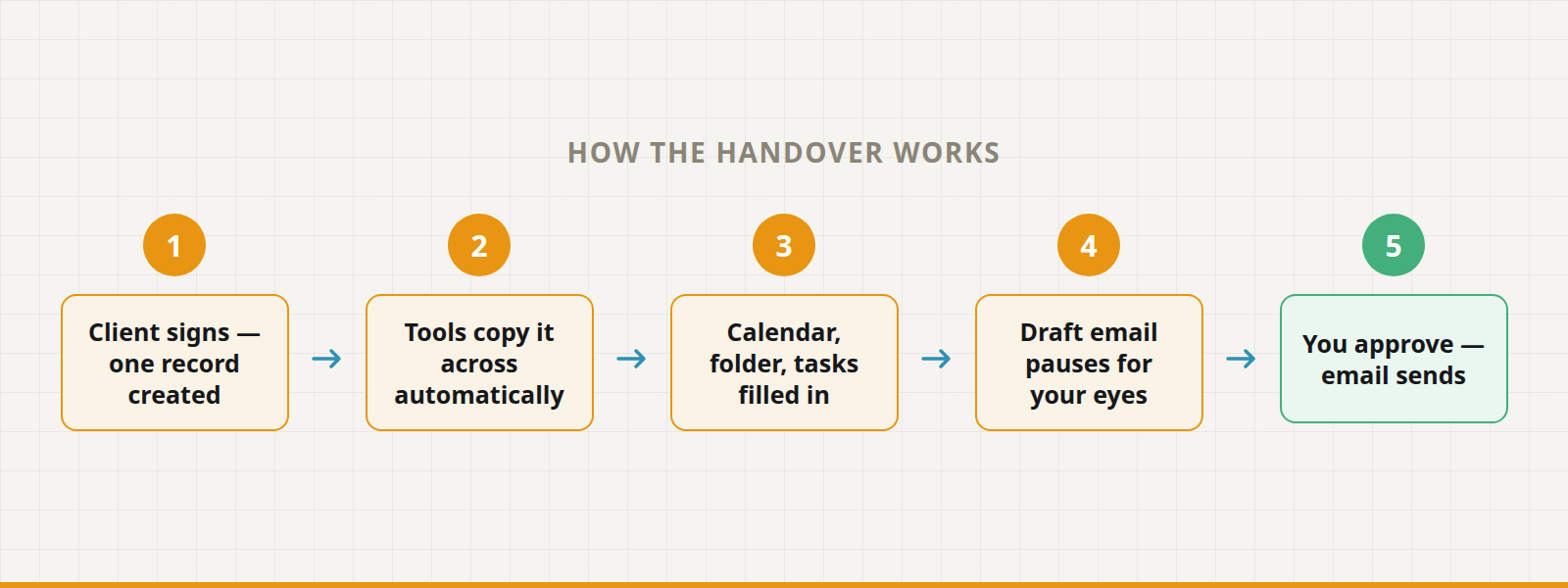
Your person’s job becomes a three-minute check: is this the right client, does the email read right, send. Six of those is 18 minutes a month — about $12 of someone’s time — plus a few dollars of AI usage. A $140-a-month chore becomes roughly a $20 one.
You don’t get all of it back. Setting this up costs real time up front, and someone has to maintain it when your accounting software changes its screens. But the shape of the saving is honest: it isn’t that the software got cleverer. It’s that a person stopped being the wire between two boxes.
The honest caveats
Most of this is early, and some of it will not arrive the way it’s being sold. The four fronts above are at genuinely different stages, and a vendor describing all four as shipping today is describing a hope. Ask which one they mean.
“Works with all your tools” almost always means “works with the eight we’ve tested.” The only useful version of that question names your own systems out loud: does it connect to the accounting package we use, on the version we’re on?
A connection is a door, and it’s also an instruction channel. When an assistant can read your inbox and act on it, a message crafted to fool it becomes a way in. A supplier email saying our bank details have changed, please update the record is exactly the kind of thing a helpful assistant will helpfully do. This is not a hypothetical the industry is ignoring — the newest of these agreements assumes outright that the assistant itself may be fooled, and designs around that. But at your end it means the same boring discipline as hiring: start read-only, decide what needs a signature, and keep a log you can actually read.
The things written about this age badly. These agreements are revised every few months, and a confident article from last year may describe something that no longer exists. Including, eventually, this one.
And a handover you barely use isn’t worth wiring. Four minutes saved on something that happens twice a month will never repay the setup. Count the task before you automate it.
The one that isn’t ready: letting software pay
That fourth front — giving software a way to pay for things on your behalf — is the one to watch slowly.
The hard part was never the payment. It’s the proof. How does a supplier know that you, a person, approved this exact purchase at this exact price — and not something an assistant talked itself into at two in the morning? The answer being drafted is a kind of signed permission slip: you approve a specific purchase within specific limits, and that approval travels with the order so the seller can check it independently. It’s a sound idea. It is also a draft, not a finished agreement, and the banks and payment processors you already use don’t support it yet. Anyone offering you an assistant with a company card attached today is doing it without that proof. Our own position is unglamorous and will stay that way until the picture changes: no assistant of ours moves a client’s money. A person clicks.
What to actually do about it
Don’t buy the future picture. Buy one handover.
Pick the task where a person is most obviously the wire between two systems — the re-typing, the lookup, the copy from one screen to the next — and count it honestly: how many times a week, how many minutes, at what hourly cost. That number is the whole business case, and you can work it out this afternoon without talking to anyone.
Then ask three plain questions of anyone selling you the answer: Does it connect to the systems we already use? What exactly can it do without asking a person first? And where do I see what it did? A vendor who answers all three cleanly is selling you something real. A vendor who changes the subject to what’s coming next year is selling you next year.
That’s the work we do: picking the one handover that’s costing you the most, wiring it up to the tools you already have, and putting a human approval step exactly where it belongs — so the boring half runs itself and the decisions stay yours. If you can name the task, we can usually price it in a single conversation. Tell us what it is.